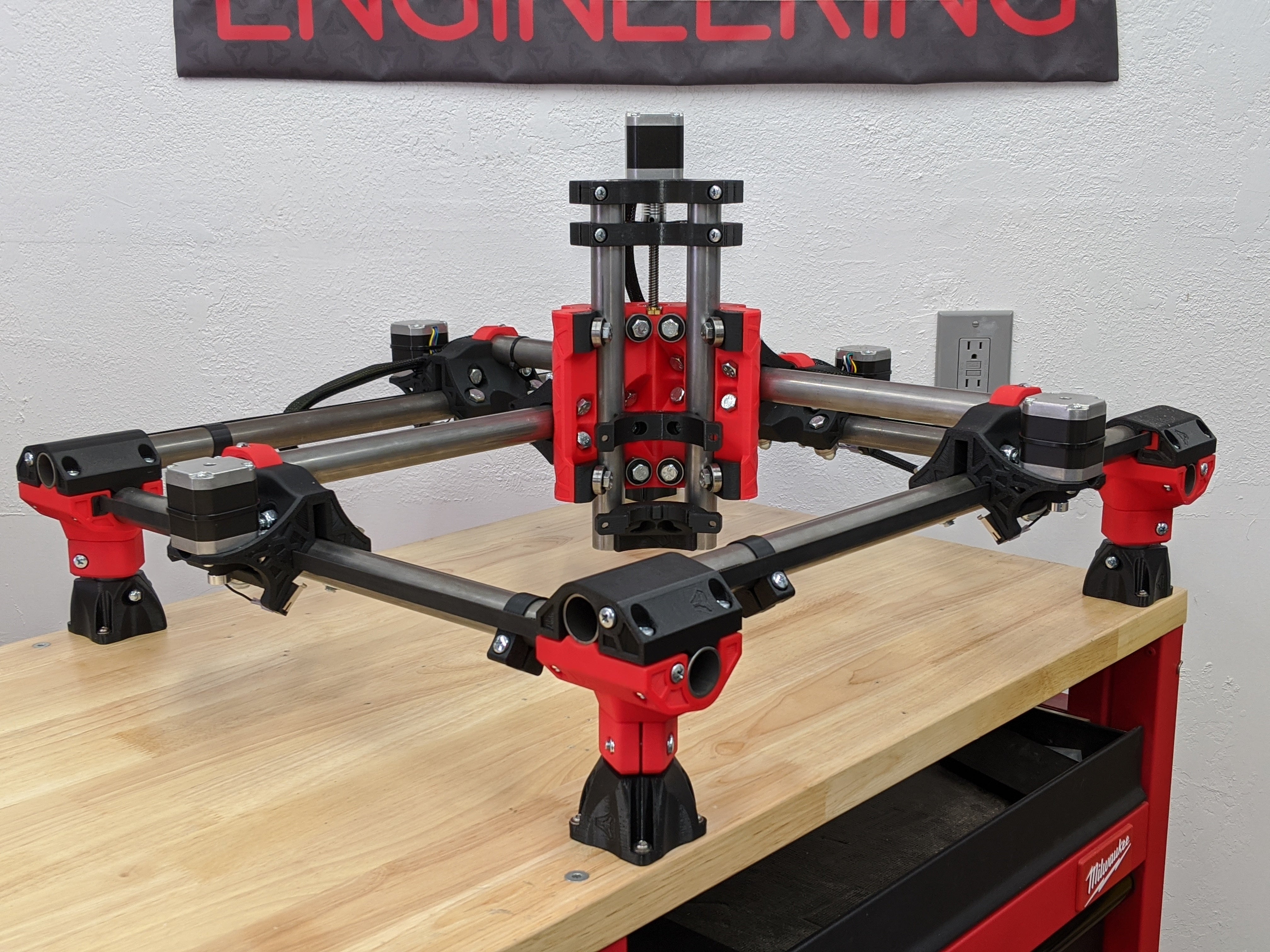
MPCNC Primo vs LowRider CNC 3 — V1 Engineering's Two Different Philosophies
V1 Engineering makes both MPCNC Primo and LowRider CNC 3. They're not competitors in the traditional sense—they're complementary. Same company, same firmware ecosystem, same philosophical DNA, but optimized for completely different problems.
Table of Contents
- The Design Difference: Fixed Bed vs. Riding Router
- Work Area & Material Volume
- Cost Comparison
- Rigidity & Precision
- Z-Axis & 3D Capability
- Setup & Workflow Difference
- Shared Ecosystem (This Matters)
- Material Capability
- When MPCNC Primo Wins
- When LowRider CNC 3 Wins
- The Decision Criteria
- Upgrade Path Reality
- Verdict
- Shop This Guide
- Related Articles
V1 Engineering makes both MPCNC Primo and LowRider CNC 3. They're not competitors in the traditional sense—they're complementary. Same company, same firmware ecosystem, same philosophical DNA, but optimized for completely different problems.
MPCNC Primo asks: "What if we made the smallest, cheapest CNC possible?" Answer: a 24×24" machine for $500.
LowRider asks: "What if we made a CNC that rides on top of the work?" Answer: a 4×8 sheet router that costs $600–900 and takes up no dedicated floor space.
They're both V1 machines. They run the same firmware. The community overlaps. But they're solving different problems, and if you pick the wrong one, you'll be frustrated.
The Design Difference: Fixed Bed vs. Riding Router
| Aspect | MPCNC | LowRider |
|---|---|---|
| Frame Position | Mounted on a table; work inside the frame | Rides on top of the work |
| Work Orientation | Horizontal (work on a table) | Horizontal (work on floor/bench) |
| Work Area Definition | Limited by frame size | Limited by sheet size |
| Footprint Comparison | Small (24–48" square table) | Footprint equals work area |
| Setup Process | Mount work on table inside frame | Lay plywood flat, position router on top |
| Movement Logic | Router moves X/Y over fixed work | Router moves X/Y while riding the work |
| Z Clearance | More (~80mm, depends on spindle reach) | Tight (~20–40mm, depends on build) |
| 3D Capability | Better (more Z travel) | Limited (low Z clearance) |
In English: MPCNC is a "table machine"—you mount work on a table and the router hangs over it. LowRider is a "riding machine"—you lay a sheet flat and the router rides on top of it.
Work Area & Material Volume
This is the primary decision point.
MPCNC Primo:
- Typical work area: 24×24" (600×600mm)
- Maximum practical: 36×36" (900×900mm) before rigidity becomes problematic
- Use case: brackets, small panels, precision parts, anything under 24"
LowRider CNC 3:
- Work area: up to 4×8 feet (1220×2440mm)
- Practical size: scales with your space
- Use case: full sheets, cabinet sides, large flat panels, signs
The hard truth: if you need to route a 4×8 sheet of plywood, MPCNC doesn't exist for you. LowRider is the only option. If you only route things under 24", MPCNC is purpose-built and cheaper.
Cost Comparison
MPCNC Primo Complete Build:
- Frame kit (V1 Engineering): $200–250
- Extra conduit & hardware: $50–100
- Spindle (Makita RT0701C): $95–120
- Controller & PSU: $80–120
- Bits, misc: $30
- Total: $455–620 (typically ~$550)
LowRider CNC 3 (750×750mm):
- Frame kit (V1 Engineering): $350–450
- Extra hardware: $50–100
- Spindle (Makita RT0701C): $95–120
- Controller & PSU: $80–120
- Bits, misc: $30
- Total: $605–820 (typically ~$700)
LowRider CNC 3 (1000×1000mm):
- Frame kit: $400–500
- Hardware: $75–125
- Spindle: $95–120
- Controller & PSU: $80–120
- Bits, misc: $30
- Total: $680–895 (typically ~$800)
Cost difference: $100–300 depending on LowRider size. LowRider costs more, but you're getting dramatically more work area for the investment.
Cost per square inch of work area:
- MPCNC (600×600): $550 ÷ 360 sq in = $1.53 per sq inch
- LowRider (750×750): $700 ÷ 5,625 sq in = $0.12 per sq inch
- LowRider (1000×1000): $800 ÷ 10,000 sq in = $0.08 per sq inch
If work area matters, LowRider is dramatically cheaper per square inch.
Rigidity & Precision
Both use the same aluminum extrusion and V-wheel systems. Both achieve:
- Repeatability: ±0.5–1mm with proper tuning
- Precision ceiling: ±0.5mm achievable with care
- Surface finish: clean on wood, good on acrylic
There's no meaningful difference in rigidity when compared at the same scale. MPCNC at 600×600 and LowRider at 600×600 perform identically.
Where they differ: larger machines flex more. A 4×8 LowRider has more XY flex than a 600×600 MPCNC simply because the cantilevered distance is greater. This is physics, not design failure. Most builders accept this tradeoff.
Z-Axis & 3D Capability
MPCNC wins decisively here.
MPCNC:
- Z travel: typically 80–120mm
- Z rigidity: good (ballscrew or leadscrew, depends on upgrade)
- 3D carving: fully capable
LowRider:
- Z travel: typically 20–50mm depending on build
- Z rigidity: good but shorter travel
- 3D carving: limited (you can do it, but low Z clearance is restrictive)
Why: LowRider rides on the work, so the spindle starts only inches above the surface. You can't do aggressive 3D work when you're constrained to 30mm Z travel.
Reality: if 3D carving matters, MPCNC or a fixed-frame machine is better.
Setup & Workflow Difference
MPCNC Setup:
- Mount work on a table inside the frame
- Set work home/zero
- Run job
LowRider Setup:
- Lay plywood on a flat surface
- Position LowRider on top of the work
- Set corners or registration points
- Run job
LowRider workflow is actually simpler for large flat panels (no clamping inside a frame, work sits flat). For small precision work, MPCNC is more secure (work is clamped inside frame).
Material Capability
Both handle the same materials equally:
- Wood: excellent
- Acrylic: excellent
- MDF: excellent
- Plywood: good (tearout control needed)
- Aluminum: barely (not recommended on either)
No difference here. Material suitability is determined by spindle power and feed rate tuning, not machine design.
When MPCNC Primo Wins
- Work area under 24×24" is sufficient: purpose-built, optimal cost
- 3D carving is 50%+ of your work: better Z travel and stiffness
- Precision under 0.5mm is critical: more Z rigidity
- Budget is under $600: MPCNC is cheaper
- Setup complexity bothers you: MPCNC is simpler (work clamped in frame)
- You're new to CNC and want to learn: smaller, less intimidating
When LowRider CNC 3 Wins
- You need to route full sheets or large panels: non-negotiable requirement
- Cabinet making or furniture is your primary work: purpose-built for this
- Work area requirements exceed 24×24": LowRider scales easily
- Your shop has floor space but limited wall space: LowRider sits on the work
- Material volume matters more than precision: cutting batches of panels
- Cost per square inch is important: LowRider is dramatically cheaper at scale
The Decision Criteria
| Question | Answer → Choose |
|---|---|
| "Do I need to cut 4×8 sheets?" | Yes → LowRider; No → MPCNC |
| "Is 3D carving 50%+ of my work?" | Yes → MPCNC; No → Either |
| "What's my largest single part?" | >24" → LowRider; <24" → MPCNC |
| "Do I have limited shop space?" | Yes, floor space → LowRider; Yes, overhead → MPCNC |
| "Will I cut furniture parts?" | Yes → LowRider; No → MPCNC |
| "Is budget my constraint?" | Yes (under $600) → MPCNC; No → Either |
| "Do I need a machine I'll outgrow quickly?" | Don't plan for growth → MPCNC; Plan for growth → LowRider |
Upgrade Path Reality
MPCNC:
- Can upgrade to ballscrews (~$150–200)
- Can swap to linear rails (~$200–300)
- Cannot practically scale much larger (work area ceiling ~36×36")
- If you outgrow it, you build something else
LowRider:
- Can upgrade to ballscrews (~$200–400)
- Can scale larger (add sheet size, extend frame)
- Forward-compatible: same platform at all sizes
- If you need more, you extend it
Bottom line: MPCNC is a fixed destination. LowRider is scalable.
Verdict
MPCNC Primo is the best small-format CNC for the price. If you're routing things under 24 inches and want to learn CNC affordably, it's unbeatable. The community is large, the docs are excellent, and it's simple enough to troubleshoot.
LowRider CNC 3 is the best full-sheet CNC for the price. If you're routing cabinet parts, panels, or large flat work, it's purpose-built. Same community, same firmware, same accessibility—just different footprint.
Don't pick MPCNC expecting to do LowRider-sized work. Don't pick LowRider expecting MPCNC precision and 3D capability. Pick based on what you actually cut, not what you might someday cut.
If you have both needs (small precision + large sheets), that's two machines. Many serious shops have both. V1 Engineering made them complementary on purpose.
Shop This Guide
| Component | Source | Note |
|---|---|---|
| MPCNC Primo Kit | V1 Engineering → | Direct from designer; excellent source |
| LowRider CNC 3 Kit | V1 Engineering → | Same community, same support |
| Makita RT0701C | Amazon → | Standard spindle for both |
| GRBL Controller | Amazon: CNC Control Board → | Compatible with both machines |
| V-Wheel Bearings | AliExpress: V-wheels → | Replacements if you wear wheels |
| Ballscrew Upgrade | V1 Engineering or AliExpress | Optional, improves precision |